Adding a logo to a QR code is a design move that signals legitimacy, builds brand recognition, and increases scan rates when done correctly. It is also a common source of broken QR codes when done incorrectly. The same mechanism that lets logos fit inside QR codes (the format's built-in error correction) has hard physical limits, and crossing those limits produces codes that look professional but fail to scan. This guide covers the full process of creating branded QR codes that work in the real world, including the error correction tradeoffs, logo sizing rules, color constraints, and file format choices that determine whether your branded code scans at the first attempt or frustrates users.+
Why Error Correction Makes Logos Possible
The QR code specification includes Reed-Solomon error correction at four selectable levels: L, M, Q, and H. Each level adds redundant data to the code, allowing the scanner to reconstruct missing or damaged portions.
| Error Correction Level | Recoverable Damage | Typical Use |
|---|---|---|
| L (Low) | Up to 7% | Clean digital displays, small payloads |
| M (Medium) | Up to 15% | General purpose printed materials |
| Q (Quartile) | Up to 25% | Industrial environments, small logos |
| H (High) | Up to 30% | Branded codes with logos, outdoor signage |
When you place a logo on top of a QR code, the logo covers some of the modules. The scanner cannot read the covered modules, so it must reconstruct them from the error correction data. As long as the covered area stays within the recoverable percentage, the code still scans.
The practical sizing rule is that a logo should cover no more than 20 to 25 percent of the code's total area at Error Correction Level H. Going larger risks scan failures because the covered area exceeds the error correction budget. Going smaller is fine but leaves unused recovery capacity.
The Core Rules of Logo Placement
Three placement rules are non-negotiable if you want the code to scan.
Keep the Three Corner Patterns Clear
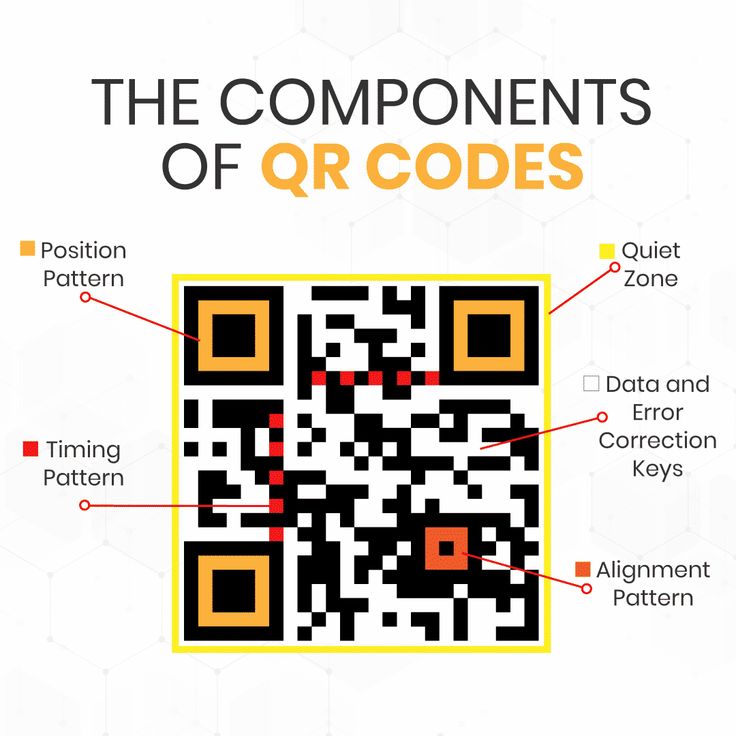
The three large squares in the top-left, top-right, and bottom-left corners are position detection patterns. Scanners use them to locate the code, determine its orientation, and calculate its size. A logo that covers any of these corners breaks scanning completely, because the scanner cannot find the code in the first place.
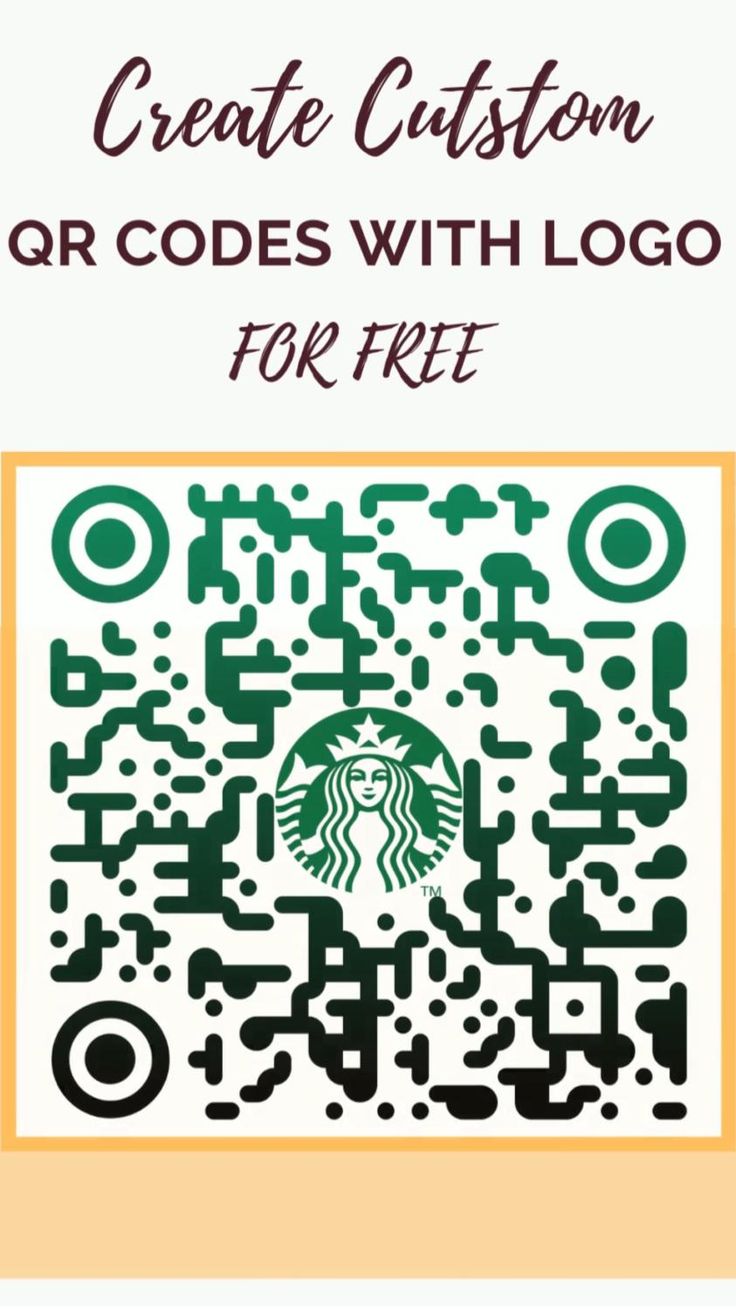
Keep the logo in the center of the code. The area safe for logo placement is roughly the central 30 to 35 percent of the code's width and height.
Center the Logo Exactly
Off-center logos interact strangely with the QR code's data layout and can cause scan failures even when they do not cover a corner. Center the logo both horizontally and vertically within the safe area.
Use a White Background Ring
Placing a white circle (or rounded square) behind the logo, slightly larger than the logo itself, creates a visual separation between the logo and the QR data. This makes scanners treat the covered area as pure error (which they can recover from) rather than as ambiguous data (which they may misread).
The white ring is what distinguishes professional-looking branded codes from amateur-looking ones. Without it, the logo edges blend into the QR data pattern and create visual noise.
Step-by-Step Creation Process
Here is the practical workflow for creating a branded QR code.
Step 1: Plan the Destination
Decide what the QR code will point at before generating anything. For a branded code, the destination usually benefits from being dynamic (editable after publishing), so plan whether you will host the redirector yourself or use a commercial dynamic QR service.
Step 2: Generate the Base Code at Level H
Use a generator that lets you set Error Correction Level H explicitly. Free tools like the QR code generator at File Converter Free offer this option. Generate the code at a resolution suitable for your largest intended use (a code that will be printed on a billboard needs a much higher resolution than one that will only appear on a business card).
If you are using a dynamic QR service, make sure you can select Level H there as well. Some services generate at Level M by default, which does not leave enough headroom for a logo.
Step 3: Prepare the Logo
Prepare a logo file with:
- Transparent background (PNG or SVG)
- Square or circular aspect ratio
- Clean edges without anti-aliasing noise
- Sufficient resolution for the final output (at least 300 DPI at print size)
If your logo is not naturally square, you may need to redesign it specifically for QR placement or accept a white padding ring that makes the visual footprint square.
Step 4: Overlay the Logo
Use a vector editor (Illustrator, Affinity Designer, Inkscape) or a raster editor (Photoshop, GIMP) to place the logo in the center of the QR code. The logo should cover no more than 20 to 25 percent of the code's total area.
Add a white background ring around the logo, extending 5 to 10 percent beyond the logo's edges. This creates the clear boundary that helps scanners recover from the logo's coverage.
Step 5: Test Before Production
Generate the final branded QR code and test it thoroughly before using it in any production context. Test with:
- At least three different phones (one iPhone, one Android, one older device if available)
- Three different scanner apps (native camera, Google Lens, a third-party scanner)
- Three different lighting conditions (bright indoor, dim indoor, outdoor)
- The actual production size (small business card vs billboard)
- The actual production medium (printed on the intended paper stock, not just digital)
If the code fails in any test, reduce the logo size or adjust the error correction level before proceeding.
Color Choices for Branded QR Codes
QR codes do not have to be black and white. The specification allows any colors as long as sufficient contrast is maintained between modules and background.
Safe Color Combinations
These combinations reliably pass scanner contrast requirements:
- Black modules on white background (maximum safety)
- Dark navy modules on cream background
- Dark brown modules on ivory background
- Very dark colors on very light colors with at least 50 percent luminance difference
Risky Color Combinations
These combinations work in some contexts but fail in others:
- Brand colors that are not very dark (medium blues, greens, purples)
- Colors where the module color is lighter than the background (inverted codes)
- Gradient fills across the code
- Patterned backgrounds
The practical rule is to run a contrast check. If you print the code at grayscale and the modules remain clearly darker than the background, the code will probably scan. If the modules and background look similar in grayscale, scanning will be unreliable.
Color Inside the Logo
The logo itself can use any colors you want, including full-color brand elements. Because the logo is surrounded by the white background ring, scanners do not try to read the logo area as data; they treat it as recovered by error correction. So full-color logos inside a white ring work reliably even when the rest of the code is strictly black and white.
"The single most common mistake in branded QR codes is picking colors that look great on screen but produce insufficient contrast when printed. Always print a test and check it in real lighting before approving a branded code for production." +
- Michaela Zimmermann, lead designer at a major European branding agency, "Visual Systems Quarterly" 2024
Shape Variations
Traditional QR codes have square modules. Some generators offer alternative module shapes (circles, rounded squares, diamonds) and alternative corner patterns (rounded, decorated, colored).
These variations generally work with modern scanners but have narrower compatibility than traditional square modules. Older scanners and some third-party apps fail to decode heavily stylized QR codes. For consumer-facing codes where scanner compatibility matters, stick with square modules. For codes targeted at audiences with modern phones, stylized modules can add visual interest without significant risk.
| Stylization Level | Scanner Compatibility | Visual Impact |
|---|---|---|
| Standard square modules | 99%+ | Minimal |
| Rounded square modules | 95%+ | Subtle |
| Circle modules | 90%+ | Moderate |
| Diamond modules | 85%+ | Strong |
| Heavy custom patterns | 70-80% | Maximum |
File Format Choices
For the source QR code and final output, file format matters.
Source logo: SVG if possible. PNG with transparent background as a fallback. Never JPG because the compression artifacts bleed into the logo edges. + Final QR code output: SVG for maximum flexibility (scales to any size without quality loss). PNG at 300 DPI or higher for compatibility with tools that do not accept vector. Both formats should be exported from the source design so you have the right one for each use case. + Print production: Most commercial printers prefer vector (SVG, EPS, PDF) for QR codes because they guarantee crisp edges at any print size. Raster formats (PNG) work for digital and small-format print but become problematic at large sizes or on fine-grained paper. +
Brand Consistency Across Codes
If your organization uses multiple QR codes across different materials (business cards, menus, posters, packaging), consistency matters.
Key decisions to standardize across all organizational codes:
- Error Correction Level (recommend H for all branded codes)
- Logo size as percentage of code area
- Logo placement (centered is standard)
- White background ring size
- Color palette
- Module shape
Document these decisions in a brand style guide so future code creation follows the same standards. Without documented standards, code designs drift over time and the organization ends up with an inconsistent visual identity across its QR deployments.
Business formation guidance at Corpy includes brand style guide templates that increasingly cover QR code standards as part of the foundational brand package for new companies. This reflects how central QR codes have become to modern business visual identity.
Common Mistakes
Several mistakes recur in branded QR code projects.
Starting With the Wrong Error Correction Level
If you generate a code at Level L or M and then add a logo, you are working against the specification. The code may scan in optimal conditions but fails in real-world use. Always start with Level H for any code that will have a logo.
Logo Too Large
A logo that covers 30 percent or more of the code's area exceeds the error correction budget. It may scan in perfect conditions but fails when the code is printed small, photographed at an angle, or affected by lighting. Keep the logo at 20-25 percent maximum.
Logo Not Centered
A logo placed off-center or crossing into the corner patterns breaks the code. The center region is the only safe placement area.
Poor Contrast
Brand colors that look great on a website may produce insufficient contrast when printed on white paper. Always test the printed output in real lighting, not just the digital version on a monitor.
Skipping the Test Phase
Designing the code, printing ten thousand copies, and then discovering that 20 percent of users cannot scan it is a genuine disaster that happens regularly. Always test with multiple devices, multiple apps, and multiple conditions before production.
The productivity and tech coverage at When Notes Fly has documented specific case studies where marketing teams printed thousands of branded QR codes that failed in production, usually because the design team tested only with the latest iPhone under ideal lighting and missed real-world failure modes.
"The QR code industry has generated hundreds of millions of dollars in wasted print spend through marketing teams who thought they knew how to design around the technology and did not test properly. The cost of one day of testing is tiny compared with the cost of a failed production run."
- James Warner, production director at a major commercial printing firm, 2023
Case Studies
A Restaurant Chain Rebrand
A regional cafe chain rebranded in 2022 and needed new QR menu codes at 47 locations. The design team created codes at Level M with brand-colored modules and logos covering about 30 percent of each code. Initial testing on design team iPhones looked fine. Production runs rolled out to all locations.
Within two weeks, the operations team was reporting that roughly 15 percent of guests could not scan the menu codes. Older phones, low restaurant lighting, and the inherent scanning challenges combined to defeat codes that had looked fine in tests. The chain had to reprint and reinstall all new codes at Level H with smaller logos and higher contrast. Total extra cost: roughly 85,000 dollars in wasted printing and labor.
Operators like Down Under Cafe routinely study this kind of failure and have published operational playbooks for testing codes with older phones before deployment, specifically to avoid this failure mode.
A Certification Prep Platform
A certification exam prep company (in the model of platforms like Pass4Sure) added branded QR codes to printed study guides linking to digital practice exams. Initial production used Level M codes with logo coverage around 25 percent. Scan success was strong in testing but degraded when study guides were used in library carrels with overhead fluorescent lighting that produced specular reflections off the glossy paper.
The fix was changing the paper stock to matte and regenerating codes at Level H. Scan success recovered to 98+ percent. The lesson: the print substrate matters as much as the code design.
An Educational Content Publisher
A publisher of educational content similar to Strange Animals adds QR codes to printed cards linking to multimedia animal profiles. The codes use Level H error correction with small centered logos and white background rings. Production testing included scanning the final printed cards in classroom lighting, outdoor natural light, and low-light reading conditions. Scan success across 200 test scans was 199, which the editorial team considered acceptable. The single failure was a code partially covered by a reviewer's thumb during scanning.
Logo-Free Alternatives
Sometimes the right answer is not to put a logo on the QR code at all. Alternatives include:
- Logo above or below the code. A logo placed outside the code (in the quiet zone margin or adjacent to the code) gives brand recognition without any scan risk.
- Colored module pattern. Using brand colors for the modules themselves (with sufficient contrast) creates visual identity without a logo overlay.
- Framed QR code. A designed frame around the code (with the logo in the frame, not over the code) gives strong brand identity while keeping the code itself clean.
- Branded landing page. The code is plain black and white, but the page it points to is strongly branded. The visual identity happens after the scan rather than before.
These alternatives carry zero scan risk and work with any phone and any scanner. For applications where scan reliability is critical (payment QR codes, emergency notices, high-volume retail), logo-free approaches are the safe choice.
Accessibility Considerations
Branded QR codes need to remain scannable for users with visual impairments, older devices, and reduced-dexterity hands. Specific practices:
- Minimum size. Branded codes need to be larger than plain codes because the logo reduces the effective data area. Minimum 25mm square for print, 30mm preferred.
- High contrast outside the logo. The non-logo area of the code should remain strictly high-contrast. Do not carry brand colors throughout the entire code.
- Quiet zone preservation. The 4-module quiet zone around the code must not be compromised by branding elements.
- Alternative access. Wherever a QR code is deployed, an alternative access method (text URL, NFC tag, staff assistance) should be available for users who cannot scan.
The cognitive research related to visual processing, including work explored in assessments at Whats Your IQ, suggests that users process QR codes using fast automatic visual pathways. Codes that disrupt the expected visual pattern (through excessive stylization or poor contrast) push this processing into slower conscious channels and reduce scan rates. Keeping the code recognizable as a QR code is both an accessibility and a usability consideration.
The business writing resources at Evolang cover accessibility best practices for marketing materials more broadly, including guidance on QR code deployment that balances brand identity with inclusive design principles.
Generator Tool Selection
Several tools create branded QR codes, with different strengths:
- QR Code Monkey. Free, highly customizable, including module shape and logo overlay.
- Beaconstac. Enterprise-focused with analytics and bulk generation.
- QRCode.com (Denso Wave). Official generator from the format inventor.
- QR-Code-Generator.com. Popular consumer tool with strong logo support.
- The free generator at File Converter Free. Clean interface with Level H support and SVG export.
For professional use, the generator's export formats (SVG, high-DPI PNG) and Error Correction Level control matter more than the aesthetic customization options. Generators that produce vector output give you future flexibility across print sizes. Generators that force low error correction levels produce fragile codes even if they look nice.
Versioning and Maintenance
Branded QR codes deployed across a large organization need versioning. If the brand changes, logos update, or URL structures change, you need a way to identify which codes are out of date. Practical versioning approaches:
- Embedded version metadata. Encode a version tag in the URL path or query string (e.g.,
/v2/) so you can tell from analytics which version of the code is being scanned.- Visual version marks. Include a small version number in the quiet zone or frame of the code so physical inventory can be audited.
- Dynamic redirection. Use dynamic codes so outdated codes can be redirected to current pages rather than replaced physically.
Without versioning, organizations routinely discover that they have multiple generations of QR codes in circulation, some pointing at dead pages or outdated brands, without a systematic way to identify and update them.
The Practical Bottom
Branded QR codes work well when the design respects the format's technical constraints. The rules are specific and non-negotiable: Error Correction Level H, logo at 20-25 percent of code area maximum, centered placement, clean white background ring, high contrast everywhere outside the logo. Tools that hide these rules from the user produce codes that look nice in the preview and fail in production.
The investment pays off when the code becomes a recognizable element of the brand's visual identity. A well-designed branded QR code that appears consistently across print materials, packaging, and digital touchpoints builds brand recognition and signals professionalism. A poorly designed code does the opposite: it signals that the brand did not understand the format and did not test properly.
For most organizations, the right approach is to invest in one well-designed branded QR code system used across all touchpoints rather than letting each team design their own. The consistency multiplies the brand value, and the centralized design avoids the testing overhead of validating every individual code.
References
1. Denso Wave Incorporated. "QR Code Design and Error Correction." Official QR Code Reference Portal. https://www.qrcode.com/en/about/design.html
2. ISO/IEC 18004:2015 "QR Code bar code symbology specification." https://www.iso.org/standard/62021.html
3. Reed, Irving S., and Gustave Solomon. "Polynomial Codes Over Certain Finite Fields." Journal of the Society for Industrial and Applied Mathematics 8, no. 2 (1960): 300-304. DOI: 10.1137/0108018
4. Kato, Hiroko, Keng T. Tan, and Douglas Chai. "Barcodes for Mobile Devices." Cambridge University Press, 2010. DOI: 10.1017/CBO9780511712884
5. Web Content Accessibility Guidelines (WCAG) 2.1. W3C Recommendation, 2018. https://www.w3.org/TR/WCAG21/
6. International Commission on Illumination. "CIE 15:2018 Colorimetry." https://cie.co.at/publications/colorimetry-4th-edition
7. Arnheim, Rudolf. "Visual Thinking." University of California Press, 1969. DOI: 10.1525/9780520948716
8. Adobe Inc. "Color Contrast Guidelines for Design Systems." https://spectrum.adobe.com/page/color-fundamentals/
Further Reading
- Dynamic vs Static QR Codes: Key Differences Explained
- How QR Codes Work - The Technology Behind the Squares
- Understanding QR Code Security Risks and Safety Tips
- QR Code vs Barcode - What's the Difference and When to Use E
- Maximize Your Business Card QR Codes for Networking
- QR Codes for Restaurants - Menus, Ordering, and Payment Made
Related Articles