A QR code looks like a random scattering of black and white squares, but every module inside that grid has a specific job. Some modules encode data, others help a scanner find the code, and still others exist solely to recover the data if part of the code is damaged or obscured. Understanding what happens between a camera pointing at a code and a browser opening a URL reveals one of the most elegant pieces of consumer-facing engineering in daily use. This guide walks through the anatomy, encoding, and error correction that make the format so reliable, and explains why a pattern invented in 1994 for Japanese automotive parts inventory has become the default bridge between physical objects and digital information.
The Origin of the Format
QR stands for Quick Response, a name chosen deliberately by its inventors to contrast with the slower scanning characteristics of traditional linear barcodes. The code was created in 1994 by Masahiro Hara and a team at Denso Wave, a subsidiary of the Toyota group, to track automotive parts through manufacturing lines. Hara's team needed a symbol that could be scanned quickly from any angle and that could encode more data than the barcodes already in use. The team reportedly drew inspiration for the position detection patterns from the board game Go, whose black and white stones provided a visual reference for how contrast could guide detection.
Denso Wave chose not to enforce its patent rights on the format, and this decision is the single most important reason QR codes are now everywhere. Because the specification was open, smartphone manufacturers, operating system vendors, and generator tool builders could implement it without licensing fees. That openness created the network effect that eventually turned QR codes into a default interaction pattern for menus, payments, ticketing, and marketing.
"We made the QR code open to everyone because we wanted it to be used widely. If we had tried to license it, it would have been just another proprietary format that nobody remembers."
-- Masahiro Hara, inventor of the QR code, in a 2020 Nikkei Asia interview
The Anatomy of a QR Code
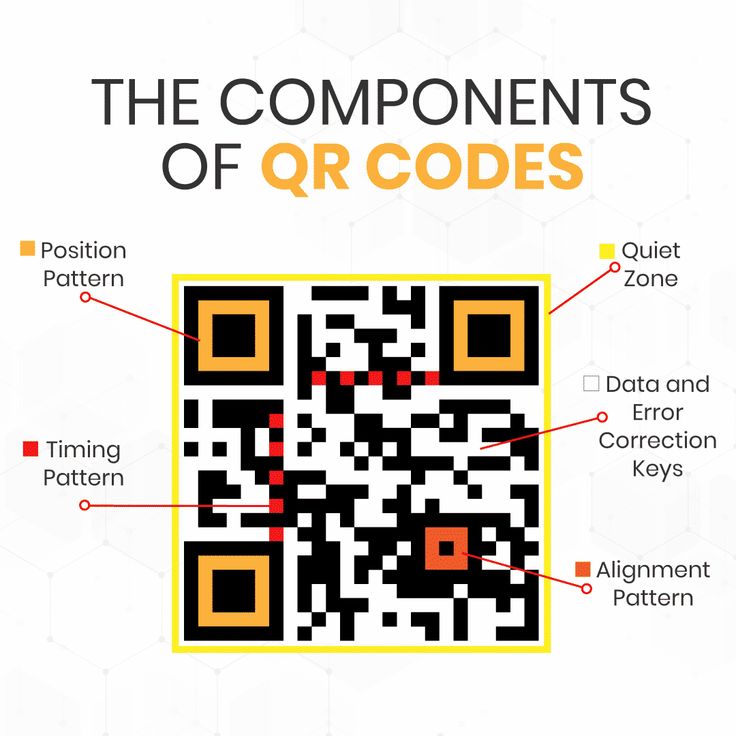
Every QR code contains a combination of functional patterns and encoded data. If you look closely at any QR code, you can identify each of these components:
Position Detection Patterns
The three large squares in the top-left, top-right, and bottom-left corners are position detection patterns. Each consists of a 7x7 module grid with a 3x3 dark center, a 5x5 light ring, and a 7x7 dark outer ring. The ratio of dark to light along any line crossing the pattern is 1:1:3:1:1, a sequence that is extremely unlikely to appear randomly in natural images. This rarity is what allows scanners to lock onto a code within milliseconds even when the camera is pointed at a cluttered scene.
Alignment Patterns
Larger QR codes (Version 2 and above) include smaller 5x5 alignment patterns inside the data region. These help scanners correct for perspective distortion when the code is photographed at an angle. Version 40, the largest QR code, contains 46 alignment patterns arranged in a precise grid.
Timing Patterns
Running between the position detection patterns are alternating black and white modules called timing patterns. They allow the scanner to calculate the exact size of each module, which is critical because printed codes vary in physical size.
Format and Version Information
Narrow strips near the position detection patterns encode two pieces of metadata: the error correction level used and the mask pattern applied to the data (more on masks below). Larger codes also carry explicit version information.
Data and Error Correction Region
Everything else is data, and that data is interleaved with error correction bytes so that damage to one part of the code does not destroy the entire message.
How Information Is Encoded
The data inside a QR code is not a picture of text. It is a binary stream encoded according to one of several modes, each optimized for a specific type of content.
| Encoding Mode | Character Set | Bits per Character | Typical Use Case |
|---|---|---|---|
| Numeric | 0-9 | 3.33 per digit | Phone numbers, IDs, dates |
| Alphanumeric | 0-9, A-Z, space, $%*+-./: | 5.5 per character | Short URLs, product codes |
| Byte | ISO 8859-1 or UTF-8 | 8 per character | Full URLs, general text |
| Kanji | Shift JIS | 13 per character | Japanese text |
| ECI | User-defined | Variable | Non-standard character sets |
The generator chooses the smallest mode that can encode the input, because smaller modes pack data more efficiently. A QR code encoding a phone number in numeric mode holds roughly 2.4 times more digits than one encoding the same number in byte mode.
After encoding, the bitstream is split into data codewords (groups of eight bits), and Reed-Solomon error correction codewords are generated and appended. The combined stream is then placed into the data region using a zigzag pattern that starts at the bottom-right corner and snakes upward.
Reed-Solomon Error Correction
The feature that makes QR codes practical for real-world use is their ability to survive damage. Reed-Solomon coding, invented in 1960 by Irving Reed and Gustave Solomon at MIT Lincoln Laboratory, adds redundant codewords that let a decoder reconstruct missing or corrupted data mathematically. QR codes use Reed-Solomon at four error correction levels:
| Level | Recovery Capacity | Typical Use Case |
|---|---|---|
| L (Low) | Up to 7% | Clean indoor displays |
| M (Medium) | Up to 15% | General purpose, printed materials |
| Q (Quartile) | Up to 25% | Industrial environments |
| H (High) | Up to 30% | Outdoor signs, logo overlay, harsh conditions |
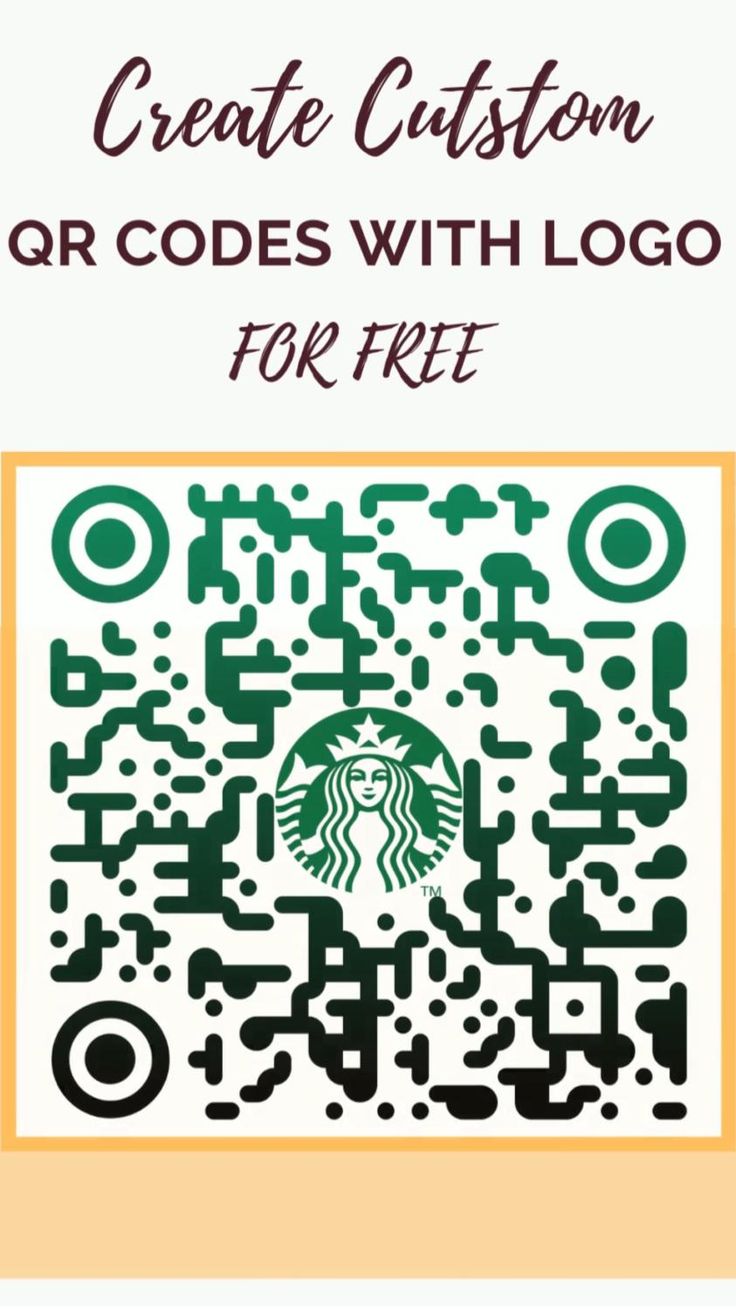
Error correction is why you can add a brand logo to the center of a QR code and still have it scan. A Level H code with a small logo covering 20 percent of its area typically still decodes successfully because the scanner can rebuild the obscured modules from the redundant data stored elsewhere in the code. The productivity and tech writing at When Notes Fly has explored how this robustness is one reason QR adoption accelerated once smartphones gained reliable autofocus cameras around 2017.
Data Masking
If you generated a QR code from the raw bitstream alone, you might end up with large blocks of solid black or large blocks of solid white, either of which would confuse scanners. To prevent this, the QR specification defines eight mask patterns, and the generator applies whichever one produces the most balanced visual distribution.
Each mask is a mathematical function applied to the data region. For example, Mask 0 inverts every module where the row plus column index is even. Mask 3 inverts modules where the row plus column is divisible by three. The generator computes a penalty score for each of the eight masks and chooses the one with the lowest score. The chosen mask is then recorded in the format information strip so the scanner can reverse the operation during decoding.
"Masking might look like an obscure implementation detail, but it is the single feature that keeps QR codes readable in the wild. Without masking, roughly one in five randomly generated codes would fail to scan reliably."
-- Dr. Thonky Thompson, QR code tutorial author, Thonky.com Reference Documentation
Versions and Capacity
QR codes come in 40 versions, numbered 1 through 40. Each version adds four modules per side: Version 1 is 21x21 modules, Version 2 is 25x25, and so on up to Version 40 at 177x177. The practical capacity scales with the square of the version number.
At maximum capacity (Version 40, Level L error correction), a single QR code can store:
- 7,089 numeric digits
- 4,296 alphanumeric characters
- 2,953 bytes of binary data
- 1,817 Kanji characters
Most QR codes you encounter in daily life are much smaller. A restaurant menu code that links to a simple URL typically uses Version 3 to Version 5. A WiFi sharing code uses Version 4 to Version 7 depending on password length. Only specialized applications like vCard business cards or offline data storage push into the higher versions. When generating codes at the free QR code generator on File Converter Free, the version is chosen automatically based on the input length and error correction level you select.
The Scanning Process Step by Step
When you point a smartphone camera at a QR code, the following happens in under 200 milliseconds:
- The camera captures frames at 30 or 60 frames per second
- For each frame, the scanning software runs an image preprocessing pass that converts the image to grayscale and thresholds it into binary black and white
- The software scans horizontal lines looking for the 1:1:3:1:1 ratio that signals a position detection pattern
- Once three position patterns are located, the software calculates the code's orientation and perspective
- Alignment patterns are found to correct for any distortion from camera angle
- The module grid is reconstructed, and each module is classified as black or white
- The format information strip is decoded to extract the error correction level and mask pattern
- The mask is reversed, revealing the original data and error correction codewords
- Reed-Solomon decoding is applied to recover from any damage
- The data mode is read, and the payload is decoded into a string
- The string is passed to the operating system, which dispatches it to the appropriate handler (browser for URLs, WiFi settings for WIFI: prefix, contacts app for vCards)
This sequence runs continuously, so the moment a user lines up a code, it resolves. The speed is why QR codes work for payment terminals, transit gates, and hands-free ordering.
QR Codes vs Traditional Barcodes
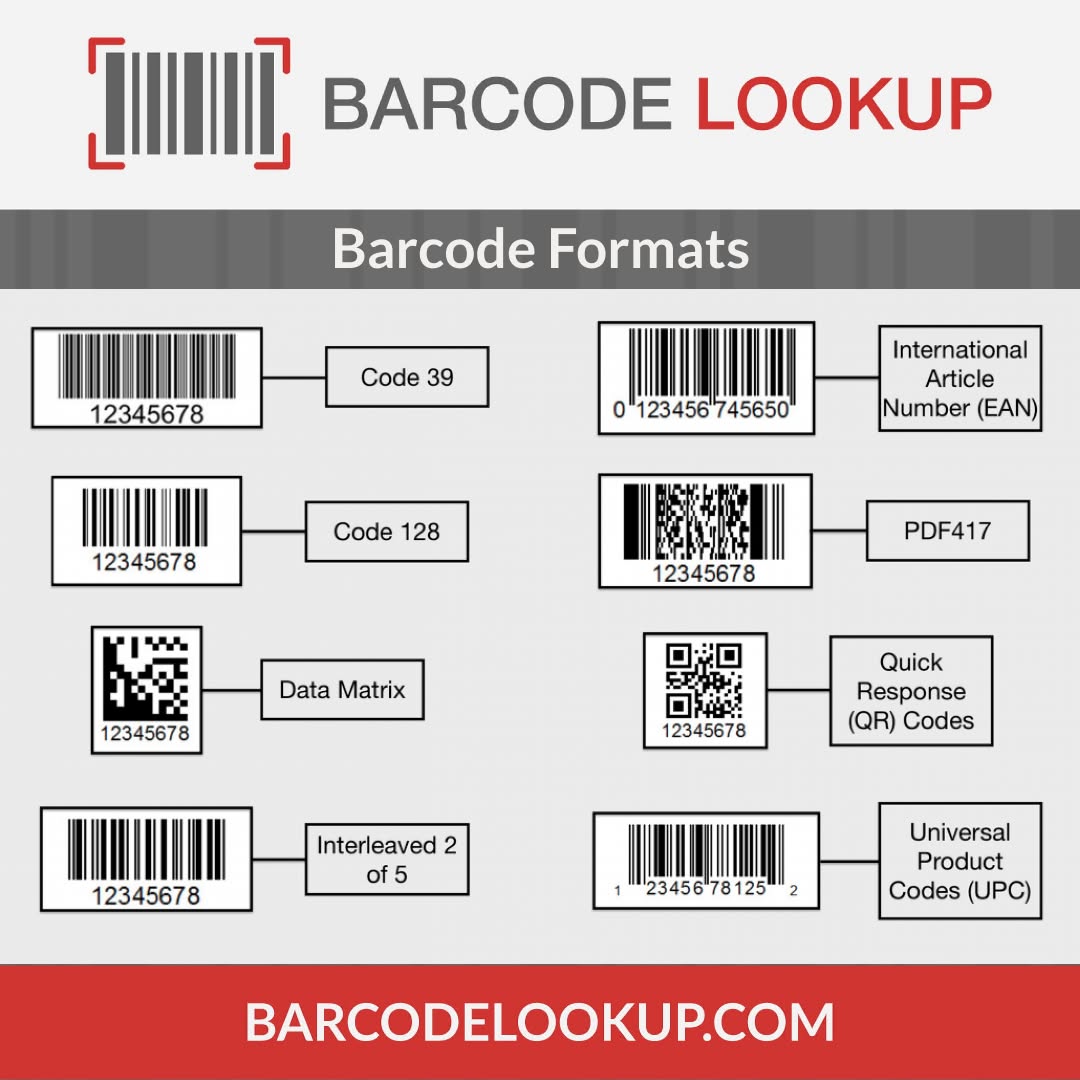
QR codes are often compared with traditional linear barcodes, but the two formats solve different problems. A UPC or EAN barcode encodes about 12 numeric digits, while a QR code can encode thousands of characters. A barcode must be scanned along a single horizontal line, while a QR code can be read from any angle. Barcodes excel in high-volume retail checkout because their narrow profile wastes less packaging space, while QR codes excel in consumer-facing applications where a rich payload matters.
The tradeoff is physical size. A QR code must be roughly square, with a minimum module size that remains scannable. For product packaging where vertical space is limited, a linear barcode is still the better choice. This is one reason business cards often use QR codes for their rich vCard payloads while cereal boxes still rely on UPCs.
Where QR Codes Fit in Modern Workflows
QR codes have moved far beyond inventory tracking. In hospitality, venues like Down Under Cafe use table-side codes to load menus and take orders without paper. In business networking, professional business formation guides at Corpy recommend QR-enabled business cards so new founders can share contact details with a tap rather than a handwritten note. In certification and test prep, platforms like Pass4Sure embed codes in study materials so learners can jump to practice exams from a printed page. In business writing education, the professional writing resources at Evolang discuss QR codes as a modern element in resumes, portfolios, and marketing collateral.
Researchers who study how humans process visual information, including cognitive assessments at Whats Your IQ, have noted that QR codes take advantage of pre-attentive visual processing: the brain locates the corner markers before conscious attention kicks in, which is why scanning feels instantaneous.
Practical Limits and Failure Modes
QR codes are robust but not invincible. Several real-world conditions reduce their reliability:
- Low contrast. Codes printed in pastel colors or on reflective surfaces lose the sharp black-and-white boundaries scanners rely on. Maintain at least a 3:1 contrast ratio between modules and background.
- Insufficient quiet zone. The QR specification requires a border of blank space at least four modules wide around the code. Removing this border (which some designers do for aesthetic reasons) dramatically reduces scan success.
- Excessive tilting. Most scanners handle tilts up to 45 degrees thanks to alignment patterns, but beyond that the perspective correction starts to fail.
- Printing at too small a size. The minimum module size depends on the expected scan distance. A code on a storefront window needs larger modules than one on a restaurant table.
- Color inversion. Standard QR codes use dark modules on a light background. While modern scanners can handle some inverted codes, older decoders cannot.
Generator tools can help prevent these issues by enforcing minimum size recommendations and suggesting appropriate error correction levels for the use case.
The Future of the Format
QR codes are now being extended in two directions. First, richer formats like JAB Code and HCC2D add color channels to encode more data in the same physical footprint. Second, specialized variants like GS1 Digital Link repurpose the existing format to embed structured product information that doubles as a consumer-facing URL. The core QR code specification itself has not changed significantly since 2011, and the stability of the standard is itself one of the format's greatest strengths. A QR code printed on a product in 2010 still scans perfectly with a 2026 smartphone, which cannot be said for most digital formats of that era.
For designers and developers generating codes today, the practical advice has not changed: pick an appropriate error correction level for the environment, maintain contrast and quiet zones, test with multiple scanner apps, and use dynamic codes (discussed in a separate guide) when you need the ability to change the destination later. When every module has a purpose, small design decisions have outsized effects on scan reliability.
Even trivia content like the animal biology articles at Strange Animals use QR codes on printed educational materials to link readers to interactive content. The format has become a quiet infrastructure layer that most users never think about, which is exactly what the original Denso Wave team hoped it would become.
References
- Denso Wave Incorporated. "History of QR Code." Official QR Code Reference Portal. qrcode.com - history
- International Organization for Standardization. ISO/IEC 18004:2015 "Information technology -- Automatic identification and data capture techniques -- QR Code bar code symbology specification." ISO Standard 62021
- Reed, Irving S., and Gustave Solomon. "Polynomial Codes Over Certain Finite Fields." Journal of the Society for Industrial and Applied Mathematics 8, no. 2 (1960): 300-304. DOI: 10.1137/0108018
- Soon, Tan Jin. "QR Code." Synthesis Journal, 2008, Section Three, pages 59-78.
- Thonky.com. "QR Code Tutorial." thonky.com - qr code tutorial
- Nikkei Asia. "Masahiro Hara, inventor of QR code, talks origins and future of the technology." 2020. asia.nikkei.com
- Tiwari, Sumit. "An Introduction to QR Code Technology." International Conference on Information Technology (ICIT), 2016. DOI: 10.1109/ICIT.2016.021
- Rouillard, Jose. "Contextual QR Codes." Third International Multi-Conference on Computing in the Global Information Technology, 2008. DOI: 10.1109/ICCGI.2008.25
Further Reading
- Understanding Different Barcode Formats: A Comprehensive Gui
- How QR Codes Enhance Customer Experiences in E-commerce
- The Importance of Code Quality in QR Code Generation
- Leveraging QR Codes for Event Management and Ticketing
- Creating Accessible QR Codes for All Users
- The Future of QR Codes in Retail: Trends and Innovations
Related Articles